Table tablet ordering systemThe menu
is already
on the table.
Guests order and pay on a fixed tablet on the table, without their own phone and without waiting for staff.
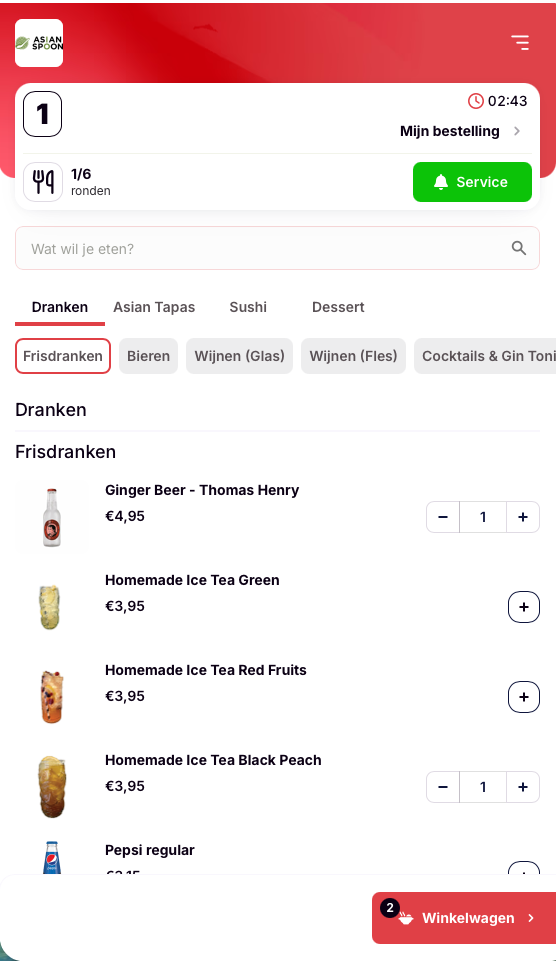
How it works.
From table to kitchenThe table orders on the tablet
The menu is open, in the guest's language. Ordering more later is also possible, on the same bill.
Kitchen and bar get the ticket
Each dish goes straight to the right department, on the receipt printer or the kitchen screen.
The table pays
On the tablet, with iDEAL, Apple Pay, Google Pay, Bancontact or credit card.
Ordering without
your own phone.
FeaturesFor guests without a smartphone
Not every guest wants to use their own phone. With a fixed tablet on the table, that guest can order too.
The same menu as the POS
Dishes, prices and discounts are the same as on the POS, the QR code and the handheld. You change them once.
All You Can Eat
The number of rounds, the time limit per table and the maximum number of dishes per person also apply to orders via the table tablet.
Menu in the guest's language
Guests read the menu in Dutch, English or Chinese. The kitchen gets the receipt in the language set for that section.

Every guest
orders their own way.
The table tablet works together with QR ordering and the handheld. Guests with a smartphone scan the QR code, others order on the tablet and staff take orders with the handheld. Everything goes into iButler Kassa.
- Tablet and QR code in the same venue
- One bill per table
- The same rules for tablet, QR and handheld
Works together with
the rest of iButler.
IntegrationsOrders from the table tablet, the QR code and the handheld go into the same POS, with the same menu and prices.
Guests pay on the tablet, with the same payment methods as QR ordering.
Frequently asked questions.
Table tabletWhat is a table tablet?
A fixed tablet on the table where guests view the menu and order themselves. The order goes straight to the POS and to the right receipt printer or kitchen screen.
Do guests need a smartphone?
No. The tablet is on the table. Guests with a smartphone can also scan the QR code, and staff can take orders with the handheld.
Can I use my own tablets?
Often, yes. iButler works in the browser, so a tablet you already have can often be used. We check in advance whether your devices work. You can rent or buy new tablets.
Can guests pay on the tablet?
Yes. Guests pay on the tablet, with iDEAL, Apple Pay, Google Pay, Bancontact or credit card. These are the same payment methods as QR ordering.
Does the table tablet work for All You Can Eat?
Yes. You set the number of rounds, the time limit per table and the maximum number of dishes per person. These rules also apply to orders via the table tablet.
Which languages is the menu available in?
In Dutch, English and Chinese. You set the kitchen receipts per section to Dutch, English or Chinese.
Can I combine the table tablet with QR ordering?
Yes. Guests order via the QR code or the table tablet and staff with the handheld. Everything goes into the same POS, with the same menu and prices.
How quickly can I start?
Within 1 to 5 working days, including installation and training for your staff.
What does the table tablet cost?
You pay a fixed amount per month. We discuss what that means for your business in the free demo.
How do I reach support?
Monday to Friday from 09:15 to 17:00 on 040 711 4761 or info@wappstars.nl. Outside office hours there is an emergency line, 040 304 3388.
What is a table tablet ordering system?
Ordering on a fixed tablet
With a tablet ordering system, every table has a tablet with the digital menu. Guests order there themselves, without their own phone and without waiting for staff. The order arrives in the POS immediately and goes automatically to the right receipt printer or kitchen screen.
For guests without a smartphone
Not every guest wants to or can scan a QR code with their own phone. With a fixed tablet on the table, that guest can order and pay themselves with iDEAL, Apple Pay, Google Pay, Bancontact or credit card, just like with QR ordering. The table tablet works alongside iButler QR and the staff handheld. All orders go into iButler Kassa, with the same menu, prices and discounts.
Made for All You Can Eat
For All You Can Eat, the table tablet uses the same rounds, time limits per table and maximums per person as QR orders and the handheld. Dishes go automatically to the right kitchen section, such as sushi, wok or grill. Guests read the menu in Dutch, English or Chinese, and you print kitchen receipts per section in one of those languages.
Quick start, fixed amount per month
iButler works in the browser, so a tablet you already have can often be used. You can rent or buy new tablets. Installation takes place within 1 to 5 working days, including training for your staff. You pay a fixed amount per month.